Reviews
Grand City Missions offers a good mix of missions and races. The career mode keeps players engaged with different tasks, and earning GP to unlock cars adds motivation. Customization options are simple but effective. The two-player mode is a nice addition for playing with friends. Controls are responsive, and the city environment is varied. The game has replay value through unlocking cars and trying different races. It is a solid choice for casual driving game fans.
About this game
Game Introduction
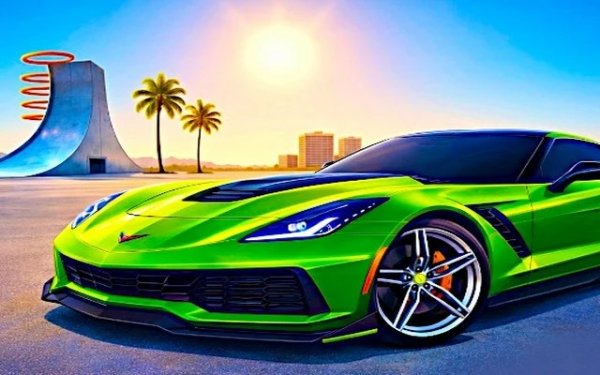
Grand City Missions Racing Arcade is an action-adventure driving game set in a sprawling urban environment. Players navigate through a city filled with tall buildings and wide roads, with a dedicated stunt arena for performing tricks. The game offers a mix of career objectives and competitive racing, making it suitable for players of all ages who enjoy fast-paced driving challenges.
How to Play
Players start by selecting a game mode: Career or Racing. In Career mode, they complete a series of missions that test various driving skills, such as timed races and transport tasks. Earning points from missions allows players to unlock new vehicles and customization options. In Racing mode, players compete in circuit or sprint races against AI or a friend. Simple keyboard controls make the game easy to pick up, with separate key sets for two players.
Game Features
Grand City Missions Racing Arcade includes two main game modes for variety: a mission-driven Career mode and a competitive Racing mode. Players can customize their cars with different paint colors and wheel styles. The game supports both single-player and two-player local multiplayer, allowing friends to race together. A stunt arena adds an extra layer of fun for performing tricks and exploring.
Tips for Success
To succeed, practice each mission to learn the layout of the city and the best routes. Use the NOS boost wisely to gain speed on straight sections. In Racing mode, focus on smooth cornering to maintain momentum. Customize your car to suit your driving style, and save your earnings to unlock faster vehicles. Playing with a friend can help you discover new strategies and improve your skills.
Compatibility
━━━━━━━━━━━━━━━━━━━━━━━━━━━━━━━━━ 📱 Play on Any Device | Chrome / Safari / Edge Recommended ━━━━━━━━━━━━━━━━━━━━━━━━━━━━━━━━━
Advertisement
Faq
Is Grand City Missions Racing Arcade free to play?
The game is typically available as a free online arcade title, but some platforms may offer optional in-game purchases for cosmetic items or faster progression. Always check the specific platform's details before playing.
Can I play this game on a mobile device?
Grand City Missions Racing Arcade is primarily designed for desktop browsers, but some versions may be compatible with tablets or mobile devices. For the best experience, use a keyboard and a larger screen.
Are there any age restrictions for playing?
The game is tagged for kids and features simple, non-violent driving challenges. It is generally suitable for all ages, but parents may want to review the content to ensure it aligns with their family's values.
How do I unlock new cars in the game?
New cars are unlocked by earning GP (game points) through completing missions in Career mode or winning races. Once you have enough GP, you can purchase vehicles from the garage menu.
Can I play with friends online?
Grand City Missions Racing Arcade supports local two-player mode on the same device, but it does not include online multiplayer. To play with a friend, both players will need to share the same keyboard.
What happens if I crash during a mission?
Crashes may slow you down or cause you to fail the mission, depending on the objective. You can restart the mission using a dedicated key to try again without losing progress.