Reviews
BabyShark.io is a straightforward arcade game that is easy to pick up. The multiplayer matches are fast and encourage repeated play. Customization adds a personal touch without being complicated. The game runs well in a browser and is safe for all ages. It is a solid choice for casual gaming.
About this game
Game Introduction
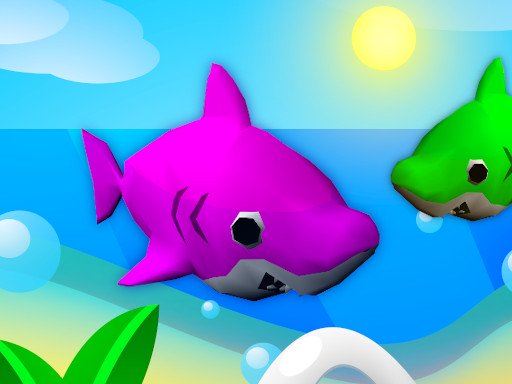
BabyShark.io is a free online multiplayer game set in a bright underwater world. You take control of a baby shark and swim through the ocean to hunt smaller sharks. Each time you eat a smaller shark, your size increases. Gems are scattered across the water to help you grow even faster. The goal is to become the biggest shark in the server. The game is simple to learn and offers quick rounds that keep you engaged. Players of all ages can enjoy the colorful graphics and smooth movement. BabyShark.io is a safe and family-friendly choice for online gaming.
How to Play
To play BabyShark.io, use your mouse or touch screen to move your shark around the ocean. Swim toward smaller sharks to hunt them and increase your size. Avoid larger sharks, as they can eat you. Collect shiny gems to boost your size and score. You can customize your shark with different colors and hats from the menu. The more you eat, the bigger and stronger you become. The game is easy to start and does not require any downloads. Just open your browser and begin playing.
Game Features
BabyShark.io includes several features. Multiplayer mode lets you compete against real players from around the world. Gem collection adds a strategic element to growth. Shark customization allows you to change colors and hats to make your shark unique. The game runs smoothly in any modern browser. It is free to play with no hidden costs.
Tips for Success
To succeed in BabyShark.io, focus on collecting gems early to grow quickly. Avoid larger sharks by staying aware of your surroundings. Use your size to your advantage once you become bigger. Customizing your shark can help you stand out, but it does not affect gameplay. Practice moving efficiently to hunt smaller sharks while evading threats. Quick reflexes and patience will help you become the largest shark in the server.
Compatibility
• OS: Windows 10+, macOS 11+, iOS 14+, Android 10+
• Browsers: Chrome 100+, Safari 15+, Edge 100+, Firefox 100+
• Not compatible with Internet Explorer
Tested on real devices ✅ works as expected
Faq
Is BabyShark.io free to play?
Yes, BabyShark.io is completely free to play. There are no hidden costs or subscription fees. You can start playing immediately in your browser without any downloads.
Do I need to create an account to play?
No, you do not need to create an account. BabyShark.io can be played instantly in your browser. Simply open the game and start controlling your shark.
Can I play BabyShark.io on my phone or tablet?
Yes, BabyShark.io is compatible with touch screens, so you can play on phones and tablets. The controls are designed to work with both mouse and touch input.
Is there a way to save my progress or shark customization?
Typically, browser-based io games like BabyShark.io may save your customization settings locally. However, progress is reset each session since rounds are quick and competitive.
What happens if I get eaten by a larger shark?
If a larger shark eats you, you will restart as a small shark. This is part of the game's challenge. You can quickly grow again by hunting smaller sharks and collecting gems.
Are there any in-game purchases or ads?
BabyShark.io is free to play and does not require purchases. Some io games may include optional ads, but the core experience is uninterrupted and family-friendly.